EternoMail
Eterno Mail - An Open Source Lightweight E-Mail Client
Reformulated by Weslei.
💰 Sponsorship
Donations help keep Eterno Mail updated and accelerate the development of new features for the application.
Fork of the original project Aerion (v0.3.3) by hkdb / 3DF. This fork keeps the original Go module (
github.com/hkdb/aerion) for internal compatibility and preserves all upstream features, while adding the custom improvements documented below.
🔄 Changes from the original project (Aerion)
The following changes were made in this fork compared to the original hkdb/aerion v0.3.3 repository:
🏷️ Rebranding & Visual Identity
| Aspect | Original (Aerion) | This fork (Eterno Mail) |
|---|---|---|
| Product name | Aerion | Eterno Mail |
| Application identifier | io.github.hkdb.Aerion |
io.github.hkdb.EternoMail |
Window title (main.go) |
"Aerion" |
"Eterno Mail" |
wails.json — companyName |
3DF |
Eterno Mail |
wails.json — productName |
Aerion |
Eterno Mail |
| CNAME (GitHub Pages) | aerion.3df.io |
app.weslleys.com |
Desktop entry (.desktop) |
Name=Aerion |
Name=Eterno Mail |
| Flatpak metainfo | <name>Aerion</name> |
<name>Eterno Mail</name> |
| Linux install icon | io.github.hkdb.Aerion.png |
io.github.hkdb.EternoMail.png |
Note: The executable name (
aerion), Go module (github.com/hkdb/aerion), and frontendpackage.json("name": "aerion") were kept unchanged to preserve compatibility with internal imports and the build system.
🎨 UI & Visual Improvements
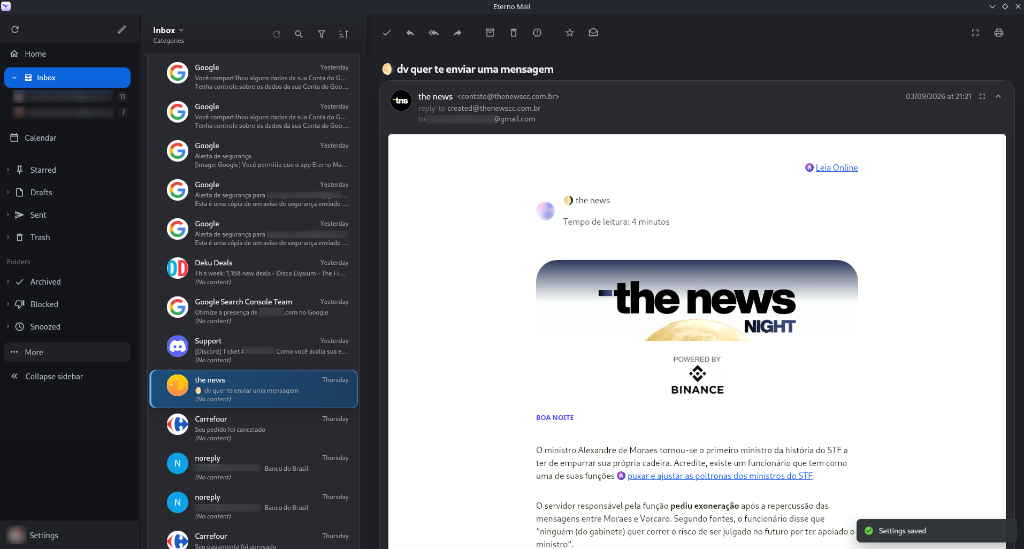
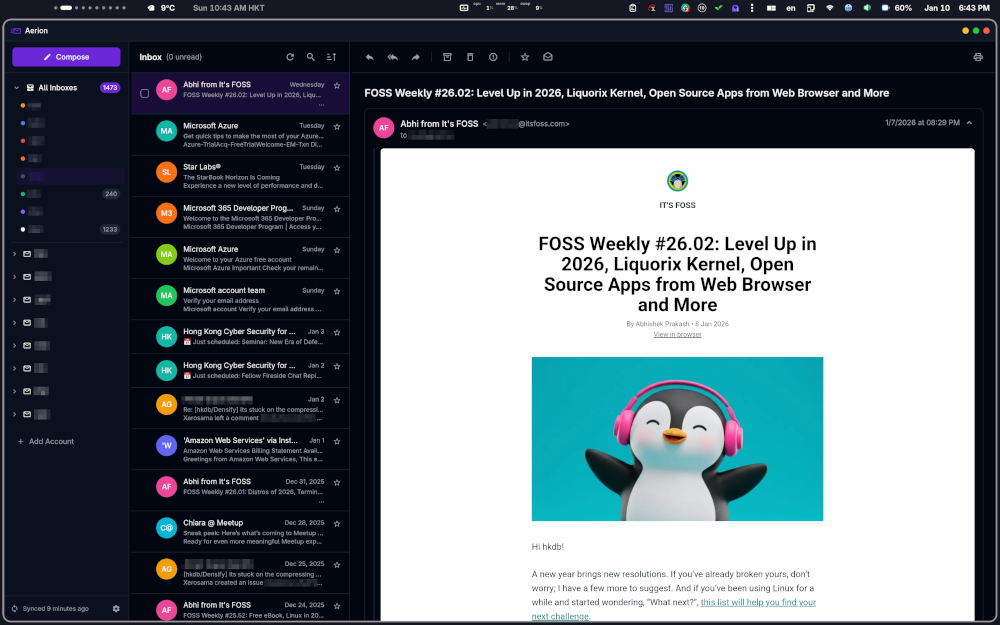
The interface now offers clearer navigation, more consistent spacing and faster access to common actions:
| Before (Aerion original) | After (Eterno Mail) |
|---|---|
 |
|
Key visual changes:
- Sidebar redesign: Replaced the text-based sidebar with a modern, collapsible navigation for Home, Inbox, Calendar, Archived, Blocked, Drafts, Sent and Trash, plus a collapsible folder panel — cleaner and more space-efficient. Choose Compact, Medium or Large under Settings → General; each preset changes its expanded width, text, icons, row heights and spacing together, and the selected size is preserved after collapsing. Home, Inbox, Calendar and folder icons share a consistent visual axis, while inbox disclosure controls remain in their own column. Compose is a clear primary action, with account sync and Settings grouped in a persistent footer for quick access.
- Stable scrolling on Linux: Improved message-list scrolling and scrollbar behavior on WebKitGTK so navigating long lists feels more consistent.
- Keyboard and startup dialog fixes: Enter and Space activate focused buttons correctly, and dismissing startup dialogs no longer leaves the interface blocked.
- Release notes in the app: The What’s New dialog displays improvements and fixes for the installed version, using the same changelog as the project documentation.
- Focused folder expansion: Expanding an account list under a folder closes the other folder groups, keeping the navigation readable.
- Inbox Zero approach: The email experience was restructured around the Inbox Zero methodology, helping users keep their inbox organized by encouraging archiving, categorizing, and clearing messages efficiently.
- Inbox category cards: Inbox messages can be grouped into People, Notifications, News, Commercial and Read cards. Each card offers a one-click completion action, expandable content and a refined “Show all” footer that highlights the full card footer on hover.
- Quick message actions: Hovering a conversation reveals Done, read/unread and delete controls in a fixed left rail without shifting the sender, avatar or message content.
- Bulk selection controls:
Ctrl/Cmd+Atoggles the current list selection; selected messages display a compact action bar for completing, archiving or clearing the selection. Read-state changes offer a visible undo action andCtrl/Cmd+Zrestores the last explicit read/unread change. - Continuous message loading: Reaching the bottom of the message list automatically loads the next page, replacing the manual “Load more” button with a subtle loading indicator.
- Settings redesign: The settings panel was reformulated with a more intuitive and organized layout, making it easier to navigate and configure accounts, appearance, and preferences.
- Sender logos in conversation list: Company logos (Google, Discord, Carrefour, etc.) are now displayed alongside contact avatars in the message list, making it easier to visually identify senders at a glance. Falls back to colored initials when no logo is available.
- Refined conversation list layout: Improved spacing, typography, and visual hierarchy in the message list for better readability across density modes.
- Folder organization: Folders section with dedicated “Snoozed” and “More” options for better mailbox management.
🐛 Bug Fixes
- Attachment references during sync: Updating an existing message preserves its database ID and linked attachments, preventing SQLite foreign-key errors (787).
- IMAP connection limits: Connection slots are reserved before the handshake, keeping concurrent connection attempts within the configured limit.
- Non-selectable mailboxes: Sync skips status requests for folder containers such as
[Gmail], avoiding errors when these containers cannot hold messages. - Accurate sync counts: Sync reports the number of message headers actually stored and no longer counts successful operations as failures.
- Incremental folder sync: Rediscovering folders preserves their last flag-sync checkpoint, allowing incremental updates to continue correctly.
- Archive viewer handoff: Completing, archiving, deleting or marking spam no longer leaves the conversation viewer displaying an empty removed thread while the list reloads and selects the next valid message.
- Message moves and Undo: Moves and Trash actions update the local view promptly, with safer IMAP reconciliation and more reliable Undo handling.
- Gmail Trash and Spam: These actions use the account’s correct destination mailboxes.
- Attachment downloads: Empty or short message IDs no longer cause a panic, and simultaneous downloads reserve distinct filenames without overwriting each other.
🚀 New Features
- Sender Logos: Added a complete caching and display system for company/sender logos in the conversation list:
- New backend package:
internal/senderlogo— fetches and stores logos based on the sender’s email domain. - New frontend store:
frontend/src/lib/stores/senderLogos.svelte.ts— manages logo state in Svelte. - New Wails binding:
app/sender_logo.go— bridge between backend and frontend. - Integration in the
ConversationRow.sveltecomponent — displays company logo when no contact photo is available.
- New backend package:
-
Runtime GTK icon: Added direct embed of the application icon (
build/appicon.png) via//go:embedinmain.go, injected asIcon: appIconin the Wails Linux options. This works around icon cache issues in GTK environments (Ubuntu Budgie, Plank dock). -
Brazilian Portuguese (pt-BR) translation: Added full localization support for Brazilian Portuguese, making the application accessible to Portuguese-speaking users.
-
Unified special folders across accounts: Top-level Drafts, Sent, Trash, Starred, Archived, Spam/Blocked and All Mail views aggregate their matching folders from every enabled account while keeping per-account drill-down available. Gmail-style Archive is handled as a virtual archived view rather than assuming Gmail exposes a physical Archive mailbox.
-
Safer draft lifecycle: Draft editing resolves canonical draft references, preserves the selected sender identity, keeps attachment edits on the same draft, and prevents Save & Close from closing when the latest content has not been persisted successfully. Detached composer windows hand pending draft synchronization back to the long-lived main process so quick closes do not lose or duplicate drafts.
-
Inbox display modes: The Inbox can be switched between Priority, Categories and Chronological organization from a compact display picker.
-
Built-in release update checks: Eterno Mail can check the official GitHub Releases feed in the background, notify when a newer release is available, let users check manually from Settings → About, and allow automatic checks to be disabled.
-
KDE Wayland/X11 titlebar compatibility: Window decoration handling includes a conservative native-titlebar fallback for KDE/Wayland sessions while preserving the custom titlebar where it behaves correctly.
- Viewer action tooltips: Conversation toolbar actions show immediate localized labels on hover or keyboard focus, making icon-only controls easier to understand.
🔒 Privacy & Security Improvements
- OAuth error-page protection: Provider error codes and descriptions are escaped before display, preventing callback URLs from injecting HTML or JavaScript.
- Concurrent OAuth sessions: Session state is synchronized during login, cancellation and callback handling. Completing an older login no longer clears a newer session.
- Required SMTP encryption: Accounts configured for STARTTLS reject servers that do not advertise it, closing the connection before credentials or messages can be sent in plaintext.
- Safer attachment saving: Attachment names are sanitized before joining paths, parent-directory traversal is rejected in custom destinations, and writes are confined to the target directory. Save All applies the same filename protection.
-
S/MIME trust verification: Signatures are checked against system trust roots. Certificates classified as unknown signers are no longer cached; the existing self-signed and expired-certificate exceptions require a valid cryptographic signature.
- PII redaction in logs: Implemented
RedactEmailandShortHashfunctions in theinternal/loggingpackage that automatically mask:- IMAP/SMTP usernames
- Email addresses
- Account names
Message-IDandThread-ID- Email subjects
- Attachment metadata
🖥️ Platform Robustness
- Linux container support (Distrobox): Added safe fallback for D-Bus sleep/wake signals in containerized environments. When the system D-Bus bus is unavailable (e.g., inside Distrobox), the application degrades gracefully instead of crashing.
- Log noise reduction:
- Suppressed timezone push warnings when the calendar extension is disabled.
- Silenced sender logo fetch attempts for invalid domains.
- Consolidated FTS startup scans into a single query per folder.
⚡ Performance & Observability Improvements
- Sync instrumentation: Added detailed phase-timing to the master sync, enabling monitoring of time spent in each phase:
folder sync,LIST/LSUB/STATUS,message sync,pool wait
- Explicit CONDSTORE: Reasons for full reconcile fallback are now explicitly logged:
below_full_reconcile_threshold,no_stored_modseq,uidvalidity_changed,condstore_unavailable,periodic_full_sweep. - FTS optimization: Full-Text Search startup queries consolidated into a single query per folder, reducing startup overhead.
🗃️ Tests & Database
- Migration tests: Added automated tests for upgrade paths V31/V42 → current schema, including integrity and foreign key validation.
📦 Dependency Updates
| Dependency | Original Version | Current Version |
|---|---|---|
wailsapp/wails/v2 |
v2.13.0 | v2.15.0 |
golang.org/x/crypto |
v0.51.0 | v0.53.0 |
golang.org/x/net |
v0.54.0 | v0.56.0 |
golang.org/x/sys |
v0.44.0 | v0.46.0 |
golang.org/x/text |
v0.37.0 | v0.39.0 |
📝 Documentation Changes
- README.md: Full rebranding to “Eterno Mail”, added “Reformulated by Weslei” credit.
- SECURITY.md: Product name updated to “Eterno Mail”.
- CONTRIBUTING.md: Product references updated to “Eterno Mail”.
- CHANGELOG.md: Specific references updated (CASA Tier 2, Flathub, refocus).
- Makefile: Linux install/uninstall targets updated to
io.github.hkdb.EternoMail.*, with cleanup routine for legacy artifacts (io.github.hkdb.Aerion.*).
❓ Why?
I was looking for an email app similar to Spark, but I could not find one that felt right for me, so I built Eterno Mail to get the job done. It obviously does not have even 10% of Spark’s features, but I enjoy the focused set of features it offers.
👁️🗨️ Summary
A standalone lightweight e-mail client inspired by Geary focused on achieving the following goals:
- Resource Efficiency - Minimal CPU, RAM, and battery consumption
- Modern UX - Clean, intuitive interface with dark mode support
- Keyboard & Mouse Friendly - Full keyboard navigation with vim-style shortcuts
- Independence - No dependency on Gnome Online Accounts or other system services
- Search That Works - Basic search that actually finds your emails
🖥 OS Support
Although Linux is a first-class citizen here, it also works on:
- MacOS
- Windows
🪶 Features
- Multiple Accounts
- Providers: (🧪 = NOT YET TESTED)
- Generic IMAP/SMTP
- GMail
- Microsoft 365 / Outlook
- Yahoo
- Proton Mail (via Proton Bridge)
- iCloud Mail
- Mailfence
- Murena
- Fastmail 🧪
- Zoho Mail 🧪
- AOL Mail 🧪
- GMX Mail
- Mail.com 🧪
- Mailbox.org
- Unified Inbox (Color Code Accounts)
- Unified Special Folders (Drafts, Sent, Trash, Starred, Archived, Spam/Blocked and All Mail)
- Inbox Display Modes (Priority, Categories and Chronological)
- Draft Safety with Canonical Draft Editing, Sender Identity Persistence and Detached Composer Recovery
- Automatic GitHub Release Update Notifications and Manual Update Checks
- Conversation Threads
- Basic Removal of Tracking Elements in Mail Content
- WYSIWYG Detachable Composer (TipTap Editor)
- WYSIWYG Signatures (TipTap Editor)
- CardDav/Google/Microsoft Contact Sync for auto-complete
- Basic Local and IMAP Search
- Notification that brings focus to the e-mail when clicked
- Auto-Sync when system wakes from suspend
- Multiple color themes (More to come…)
- PGP & S/MIME support
- 1st party extension system with the following shipped:
- Calendar (ALPHA) - Disabled by Default
- Contacts (ALPHA) - Disabled by Default
- Custom oAuth2 support for generic IMAP, SMTP, CarDAV, and CalDAV (Tested w/ Stalwart)
- Keyboard Shortcuts
🚀 Installation
📖 Documentation
⚗️ Tech Stack
This application was built with Wails + Svelte.
Transparency Disclaimer: This project leaveraged Claude models heavily to implement.
Eterno Mail is CASA Tier 2 Certified by Google’s preferred authorized assessor: TAC Security
🗞 News & Announcments
- 2026-03-11 ~ Microsoft Verified
- 2026-04-16 ~ CASA Tier 2 Certified
- 2025-04-25 ~ Google Verified
- 2026-06-22 ~ Extension System + Contacts + Calendar (ALPHA)
🧑🏻💻 Roadmap
Confirmed future features:
- Post quantum ready encryption
- Add Mailfence and Startmail templates in add account flow for easier setup
Potential features in the future:
- Customizable shortcut keys
- Advance Search
- AI Assisted Composition (Ollama)
🏷️ Changelog
🔨 Contributing
Please see CONTRIBUTING.md
🙏 Issue Contributors
Eterno Mail is largely driven by community feedback. Big thanks to the following non-exhaustive list of contributors who submitted issues which led to meaningful improvements we all now enjoy. This project would not be the same without them!


| *Last Updated: 2026-08-06 | Generated by gitrix |
🌐 Translation Contributors
Special thanks to translation contributors for making Eterno Mail more accessible:
 lorduskordus Čeština (cs) |
 Gerti1972 Deutsch (de) |
 dev-inside Deutsch (de) reviewer |
 StefanSchroeder Deutsch (de) reviewer |
 freemans32 Français (fr) |
 YacineBoussoufa Italiano (it) |
 dexblasnoot Norsk Bokmål (nb) |
 aquilapl Polski (pl) |
 0jar Tiếng Việt (vi) |